
Forum Replies Created
-
AuthorPosts
-
Yes, Beast Tribes are already planned for development after we complete the core Combat system.
It will be a part of MSQ and Questing feature pack listed under [Beta] Combat.Thank you for reporting!
Would you please give us more information about your issue?- Were you present at your computer when this happened?
- Have you tried pressing Finish and then Start again?
- Have you used any keyboard shortcuts to switch between windows, such as Alt-Tab?
- Please show us a complete message log from the Output Area. (Starting from “Hello! I am your Miqobot!”)
Unfortunately, all previous versions of Miqobot are incompatible with Patch 4.5 and thus are no longer supported. Otherwise, we wouldn’t have to release the new update.
So please try to give us as much information as possible.
The more information we have, the faster we’ll be able to help you!Assist Mode is already working like Crafting Solver.
Except that the rotations are calculated on the fly and require no solving downtime.Our battle algorithms are based on multi-layered priority systems, which allow Miqobot to support single-target and AoE rotations, seamlessly switch between them when needed, dynamically adapt to your character level and icons available on hotbar, pick up the rotation at any moment in the fight, and even handle extreme lag spikes.
The important thing for the final stages is precise rotation customization, which will be available via special UI for each job. It will allow you to adjust openers and plan cooldowns with specific encounter and party synergy in mind.
This is the only way we know to achieve maximum performance in endgame raids.Not sure if my settings are wrong or it hasn’t been implemented yet but Miqobot isn’t dodging AOEs under Assist mode. It also doesn’t move towards enemy after targeting. I have to manually move close.
Indeed, Assist Mode is not designed to dodge AoE omens or take control of your character movement.
This would defeat its purpose and make it very unsafe to use in the presense of other players.The only kind of movement Miqobot will help you with is positionals for melee jobs, but this will be done only in melee range.
Regarding medica interrupt, prioritize tank healing would be great or just single target heals only if that isn’t a possibility. At least then, Miqo might save the tank, which hopefully prevents a wipe. This is just based on my experiences in leveling dungeons and specifically low levels, < 50.
All right, we’ll see what we can do 🙂
So I’ll preface this request with; it’d probably be dependent upon integration with ACT and might be out of scope…but I’d be interested in a cooldown mapper from Miqobot. After a wipe, Miqo displays the last 30seconds (or more) of a fight using ACT data or the combat log. The user then indicates when/how they want abilities to be used. Not everything needs to be mapped but whatever the user wants to map out is saved. Going forward, Miqo makes sure the skill is available and used at that point in time during the fight(s). Eventually, this will build a rotation for the fight and would be greatly helpful in “fresh” content…and even in old stuff if you want to go in “blind” and find your own path. BLU’s Masked Carnivale comes to mind
Yes, this is pretty much the way we envision the cooldown planning UI.
It’s currently in the early stages of design, so we might not be able to implement it in time for the Masked Carnivale. But we will try to improve Assist Mode as much as possible for the Shadowbringers expansion.Unrelated to the above but, I’m curious is if there’s something Miqo is using to determine distances to enemy locations near the current target, it seems very accurate with Bane usage, often hitting things I would have thought were too far. Would it be possible to put a not too obtrusive range indicator around healers so we know if AoE heals that we or Miqo are about to use will definitely hit the players we’d like them to? An additional option for this setting could be to have it appear when the threshold for Miqo to use an AoE heal is being approached, so we can move to a better spot, or make it flicker if its current setting is already on.
This is an interesting suggestion.
We will experiment with different tools of 3D Radar and see what kind of notification would work best.A minor thing, but if it isn’t too much trouble…could we also give Medica (and other AoE heals) a lockout like you mentioned Raise’s. So if I cancel Medica, don’t retry it for say 5 seconds? 15 might be too long 🙂
It’s just too eager to use it and while leveling, MP isn’t that high, plus tanks are squishy. Bad combo, haha.
Yes, we can do this 🙂
However, it’s not very obvious what Miqobot should do during this lockout.Raise is a unique spell and has no alternatives, so there are only two options – either cast it, or not cast it.
AoE heals have many alternatives, and cancelling Medica still leaves us with a wide range of other options which can be just as unwanted. Would you please give us more details about the behavior you would like to see?When you interrupt Medica cast, Miqobot should:
- Cast a different AoE heal?
- Run through a list of AoE heals and try each of them?
- Put a lockout on all AoE spells and cast single-target heals on each party member?
- Put a lockout on heals completely and DPS?
- Cease any casts for 5 seconds and let you choose the next action?
- Reconsider her decisions and temporarily follow a different set of rules?
Okay, quick follow-up:
I was having issues with my ACT as well and found out, that despite using Kaspersky Windows Firewall still keeps messing around, so I added ACT manually to the exclusion list of Windows Defender (Manage Apps through Firewall screen). Did the same with Miqo as well and for some magical reason everything is working perfectly fine now!
Thank you for informing us that you’ve managed to resolve your problem!
I have a quick question about the Role Actions with assist mode. Are the role actions also optimized with the level 50 rotations? I ask this because as I’ve been playing with WHM I’ve noticed Miqo never uses Eye for an Eye, Largesse, Surecast, Break or Rescue. But will use the other Role Actions (protect, swiftcast, esuna, cleric stance, lucid dreaming.) Is this a bug or has assist not been optimized for these skills yet?
Miqobot doesn’t use certain role actions, because rules for their usage are not very clear yet.
We might be able to design an approximate algorithm for Eye for an Eye and Largesse, but what would be the conditions for Surecast, Break, and Rescue?Surecast requires knowledge of knockback mechanics, Rescue is a positional synergetic ability, and we have no ideas about Break. Just like tank cooldowns optimization, they have to be planned differently for each encounter, which basically requires a cooldown planning UI. It will be implemented after we complete the basic ruleset for level 70.
But if you have something else on your mind, we are open to suggestions 🙂Would it be possible to add a tickbox option to enable assist mode to use consumable potions such as max-potions aswell as healing skills?
Of course, when we get closer to level 70 algorithms, potions will be weaved into the rotations and a new setting will be available on UI.
Just started on AST and noticing that it seems to always give cards to the same player. Spear/Balance at least. I even tried to swap around the party members in list and cards still followed them. In this case, cards were being given to Archer instead of Ninja, any reason?
Yes, a very simple reason.
At first this system was designed for Squadron Dungeons, and Archer NPC deals more damage than Rogue.A special customization UI will be implemented for all jobs, including AST cards priorities 🙂
January 12, 2019 at 6:12 pm in reply to: Contemplating buying, wondering if there's a trial/demo #10110We are very sorry, but we haven’t managed to restore our trial mode yet.
There has been a lot of changes in Patch 4.5 and we are still in the process of implementing important hotfixes and feature upgrades.We would kindly ask you to come back in a few weeks after the dust settles a bit. Hopefully we’ll be able to restore the demo mode by then.
We sincerely apologize for inconvenience.Thank you for your interest in Miqobot project very much!
The core module of Miqobot which is responsible for data reading and game interaction is fully reimplemented, as well as several middle-layer algorithms such as keybinds identification and icons recognition.
Basically it means that every feature is affected.We have performed the standard unit testing procedure, so there is no need for bughunting on purpose.
Just report bugs you encounter during normal gameplay.Quick update, I ended up redownloading because I had the old version.
The problem is still occuring.
We have investigated your issue.
According to our logging system, you had forgotten to input your license code after downloading the new Miqobot version. But we can see that you did it a few minutes after posting this question.Have you managed to resolve your issue?
If you still require technical assistance, please let us know.We have investigated your issue.
According to our logging system, an antivirus or firewall is still blocking Miqobot from accessing the application files on your computer.These files reside in the following directory: %temp%\miqobot\
This is how it looks like in file explorer: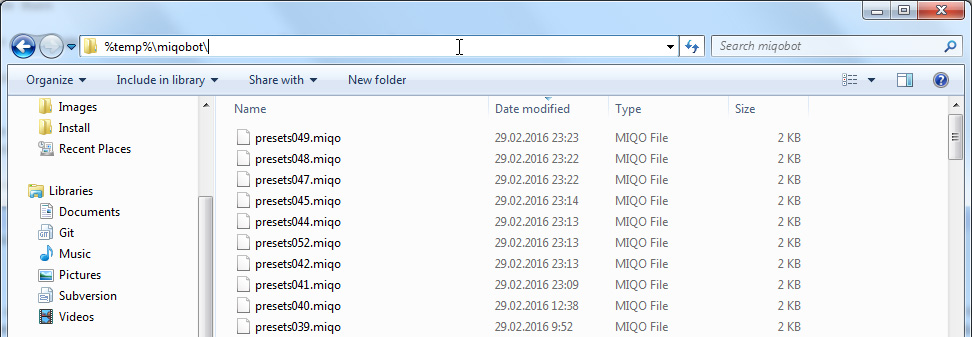
The files in question are:
– miqocraft.dll
– miqodraw.dll
– miqoradar.exeIf you don’t see these files in %temp%\miqobot\ directory, then most likely your antivirus has destroyed them.
Depending on your antivirus software, you might have to whitelist Miqobot application files and the folder they reside in.We also recommend to report this behavior to your antivirus vendor so they would be able to fix your problem in the next update.
You can also find more information in the following threads:
– miqoradar.exe showing as virus
– miqradar.exe showing as virus (a follow up)Thank you for your proposal very much!
We are very grateful for your desire to help, but unfortunately it would not remove the bottleneck in making battle rotations which is the core of the Combat module. Squadron Dungeons alone do not take a lot of time to implement, they are used as a special test area for creating and fine-tuning AI behaviors for each role and job.
However, we consider releasing the extended 3D Editor toolkit for scenario integration in the future, which will allow you to design special scenarios for any dungeon. This is planned under Custom Fights and Monster Grind feature pack.
Please hold out a little longer while we stabilize the core system, and we hope you will enjoy the new creation tools.Miqobot v1.3.20
A critical issue is addressed.
– An issue wherein Miqobot would not perform healing rotations when “Allow pulls” setting is disabled, even if the enemy is already pulled.This hotfix does not trigger “New version available” message.
Please download it only if you are affected by this issue.Upgrading battle rotations to the next level tier and creating a navigation mesh for the next Squadron Dungeon are two independent tasks which can be carried out by different developers at the same time.
Upgrading battle rotations to level 60 can only be done after upgrading to level 55 and thus can not be carried out at the same time.Therefore skipping a Squadron Dungeon does not speed up the development of battle rotations.
All right, we’ll see what we can do 🙂
But as we already mentioned, implementing battle rotations remains the bottleneck, regardless of Squadron Dungeons.
The next logical milestone is upgrading rotations for level 55. So we can do one of the following:- Release Assist Mode for 1-55 support.
- Release Assist Mode for 1-55 support + one Squadron Dungeon from this level range.
Both options will take approximately the same amount of time.
-
AuthorPosts
